
Instant Help Center search
Type a keyword and get real-time results from your Help Center. Results are paginated, so you can browse even large knowledge bases without scrolling forever.
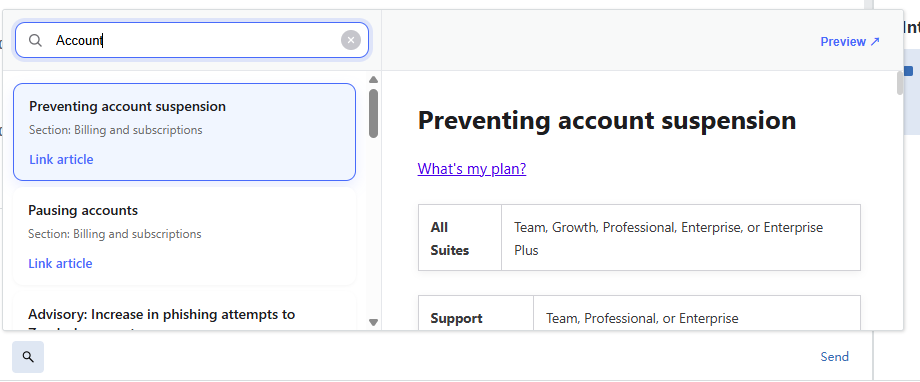
Search your Help Center and insert article links directly into tickets — without ever leaving the ticket editor.
Built for support agents who live in the ticket editor.
Type a keyword and get real-time results from your Help Center. Results are paginated, so you can browse even large knowledge bases without scrolling forever.
Preview each article in a side panel with its title and a body summary. The locale follows the agent's language automatically, so content always reads right.
Drop a formatted article link into the ticket editor with a single click using
ticket.editor.insert. A clear “Linked ✓”
confirmation lets you know it worked.
Fully keyboard navigable with proper ARIA attributes throughout, so every agent — including those using assistive technology — can search, preview, and insert.
No tab-switching, no copy-paste. Just stay in the editor.
With the ticket open, launch Help Center Linker from the apps panel inside the Zendesk ticket editor.
Enter a keyword to search your Help Center, page through results, and preview any article in the side panel.
Click insert to drop a clean article link into the reply. You'll see a “Linked ✓” confirmation right away.
Help Center Linker is designed with a simple rule: it reads only what it needs, stores nothing, and talks to no one but your own Zendesk Help Center.
Read-only article access — the app reads Help Center article data (titles, bodies, section names, URLs) via the Zendesk Help Center Search API, strictly in read-only mode.
Locale only — the app reads the current agent's locale solely to return localized search results.
No ticket, user, or organization data — the app does not access, read, modify, or delete any ticket, user, or organization data.
No storage, no third parties — the app does not store any customer data and does not transmit any data to third-party servers. All API requests are made through the Zendesk App Framework (ZAF) proxy to your own Zendesk Help Center, so customer data never leaves the Zendesk environment.